



Pressing Invest now is not the end of the work. It is the start of a portfolio that has a status, a cycle, a ledger and a list of open orders, and every one of them tells you something. Most people read only the big number. This module reads the rest, screen by screen, so that a status pill never surprises you.
Lowest published minimum first investment across 18 strategies
RupeeCase published minimums, 8 Aug 2026
Highest published minimum, one share of every holding
RupeeCase published minimums, 8 Aug 2026
Platform fee, on the value that actually trades at a rebalance
RupeeCase pricing
Fall in the Nifty 50 from 25,239.10 to 23,217.60, used in the example below
NSE closes, 16 Sep 2025 to 16 Sep 2026
Before you press Invest: the sheet and your broker cash
Invest opens a sheet called Confirm investment. It starts on Practice, which follows the strategy with no broker order. Live sends real orders to your own broker, after you tick the consent text and only while the market is open. Nothing is sent until you press Invest now. The invest sheet and Practice or Live tutorials show both modes.
Read 2 more paragraphs, 124 words
The first amount must reach the strategy minimum, the smallest sum that buys at least one share of every stock at its weight. Later top ups can be any amount. Minimum investment shows how it is worked out; Module 4.2 covers the sizing idea behind it.
In Live mode the sheet shows Broker cash available. That is the spendable cash in your broker account, read when you ask. It is advisory: if it is short, the sheet warns that some orders may be rejected and still lets you go on. On a marketplace card the same gap appears as a chip, Add ₹X, which is the minimum less your broker cash. Your money never sits with RupeeCase. Uninvested cash stays in your broker ledger.
Reading the status line and the pills
Every portfolio card carries one status sentence. Up to date means ready and not due. Putting money to work, Rebalancing now and Withdrawing mean a task is running at your broker, and the current step is added after a colon, such as selling or confirming. Paused, Waiting to start and Checking are the quiet states in between.
- Press a money actionTop up, Withdraw or Rebalance. They run only when the status is Up to date.
- Status turns busyPutting money to work, Withdrawing or Rebalancing now, with the step after a colon.
- Orders settleEach order is confirmed at the broker. The Orders tab shows what is still open.
- Back to Up to dateThe Ledger row reads Done.
- Or Needs attentionThe task stopped. Money actions pause. Resume re-checks every fill at the broker.
Read 2 more paragraphs, 77 words
Two pills sit beside the sentence. Rebalance due means the next date has arrived. Needs attention means a task stopped part way, for example an order the broker rejected. The phone tab bar adds the two together as a badge on Dashboard.
That last branch is the one to understand. A stopped Live portfolio cannot take a new investment until you open it on the Dashboard and press Resume. The portfolio card tutorial walks through each state.
Top up and withdraw
A top up adds a one time amount and spreads it across the current holdings in proportion. The mix stays as it is and nothing is sold. It does not rebalance to new picks. The sheet shows the minimum to add so every stock gets its share: per sleeve, the number of stocks times the highest price among them, divided by the sleeve weight, plus 2%, rounded up to the next ₹1,000. The Use chip fills it in. See Top up.
MythWithdraw sends the money to my bank account.
FactWithdraw sells holdings at your broker and the cash stays in your broker ledger. Moving it to your bank is a separate step at your broker.
Read one more paragraph, 73 words
A withdrawal asks for Part of it or Everything. Part of it sells about the same share of every holding: the amount over the current value. An amount at or above the value is refused, because that is Everything. The cash lands in your broker account, not with RupeeCase, and moving it to your bank is done at your broker. Selling can create capital gains tax, which Module 11.1 explains. See Withdraw.
Invested, current value and the return the Dashboard shows
The Dashboard summary reads: Current value, Profit or loss, Today, Invested, Return and Next rebalance. Current value is holdings at the latest prices plus cash, less estimated costs. Invested is money added less money taken out. Profit or loss is the first less the second, and Return is that divided by Invested. It is not per year and not time weighted. See the summary and portfolio hero tutorials.
Net money in went from ₹2,50,000 to ₹3,00,000 in Dec 2025 and fell to ₹2,40,000 in Jun 2026. The value ended at ₹2,16,797 on 16 Sep 2026, a loss of ₹23,203.
Illustration, not a client portfolio. Nifty 50 price index closes on or just after the 16th of each month (NSE), 16 Sep 2025 to 16 Sep 2026; no charges or tax. Computed by RupeeCase.
Read 2 more paragraphs, 121 words
Here is what that means with real index levels. Take a portfolio that moved exactly like the Nifty 50, with no charges. It starts with ₹2,50,000 on 16 Sep 2025, takes a ₹50,000 top up on 16 Dec 2025 and a ₹60,000 withdrawal on 16 Jun 2026.
Profit or loss is ₹2,16,797 less ₹2,40,000, a loss of ₹23,203. Return is minus 9.7%. The index itself fell 8.0% over the same dates. Same money in the Nifty 50 would read ₹2,16,797 too, so there is no gap to the benchmark. The difference is timing: the top up went in before the March 2026 fall, and Return counts it at face value. If you want the timing counted properly, Module 4.4 covers XIRR.
The Ledger and the Orders tab
The Ledger lists every event, newest first: Money added, Money taken out, Invested, Rebalanced, Withdrawn, Corporate action and Combined, each with an amount and a status of Done, In progress, Partly filled or Needs attention. A top up leaves two rows, Money added and then Invested for the buying task. A withdrawal leaves Withdrawn for the selling task and, when it finishes, Money taken out. Above the table, Money in less Money out is the Net money in, which is the Invested figure. Your own estimated charges are on the same tab, event by event.
Read 2 more paragraphs, 84 words
Orders is different. It shows only the latest task that still has work at the broker: stock, side, filled, price, status and value, with a count on the tab. Between actions it is empty, as it should be. The Ledger and Orders tutorial shows both.
Combine portfolios, under More options, merges your other ready portfolios on the same strategy and the same mode into one. It is bookkeeping: holdings and cash move over, no broker order is placed, and a Combined row records it.
Rebalance due and the cycle ring
The ring on a card shows how far through its cycle the portfolio is: days since the last rebalance over days from the last to the next, with both dates moved to the following Monday. It is full when a rebalance is due. Take Allcap, which rebalances every 2 weeks. Its model record shows rebalances on Fri 19 Jun and Fri 3 Jul 2026, which the app reads as Mon 22 Jun and Mon 6 Jul.
Share of the 14 day cycle gone
- Mon 22 Jun, last0%
- Thu 25 Jun21%
- Mon 29 Jun50%
- Fri 3 Jul79%
- Mon 6 Jul, due100%
Ring rule from the app: (day minus last) / (next minus last). Dates from the Allcap model rebalance record, 19 Jun and 3 Jul 2026. Model, back tested. Not actual client trades.
Read one more paragraph, 68 words
When the ring is full the card shows Rebalance due and a Rebalance now button. It opens Confirm rebalance, which says how long it has been due, trades at live prices, stops by itself if any stock has no live price, and orders only after your consent. Rebalancing early is allowed and simply trades at today's prices. Module 10.5 covers cadence and cost; the tutorial shows the sheet.
Model cards or your own figures
On a portfolio page the hero, key figures, Holdings and Ledger are yours. Most cards under Returns and Risk are the linked strategy's model since the day you invested, and a band says so: not your portfolio. Your fills, timing and charges make the two differ. Model cards shows how to tell them apart.
Common mistakes
- Pressing Invest now on Practice and thinking it is Live. Check the mode word first.
- Reading Return as a yearly figure. It is not per year.
- Expecting a top up to rebalance. It buys what you hold, in proportion.
- Ignoring Needs attention. Money actions stay paused until it is resolved.
- Treating a model card as your own return.
How this shows up in RupeeCase
Everything above is how the RupeeCase terminal works today. The stocks sit in your own demat, orders go through your own broker, and the fee is 0.2% of the value that trades. You can read each strategy's published record before investing, for example Allcap. Start in Practice if you want to watch a full cycle without a real order.
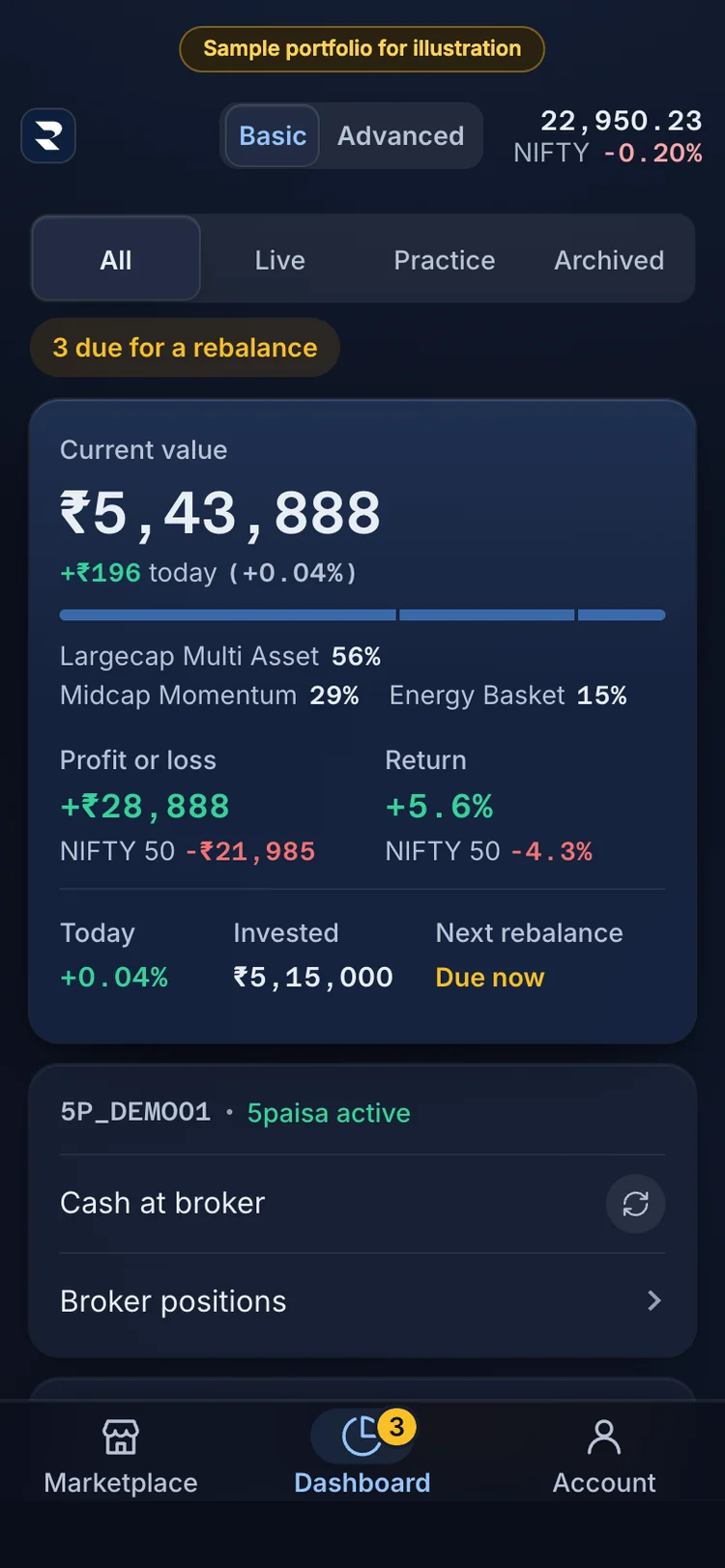
1The Dashboard sums up your portfolios: current value, profit or loss, return and invested. 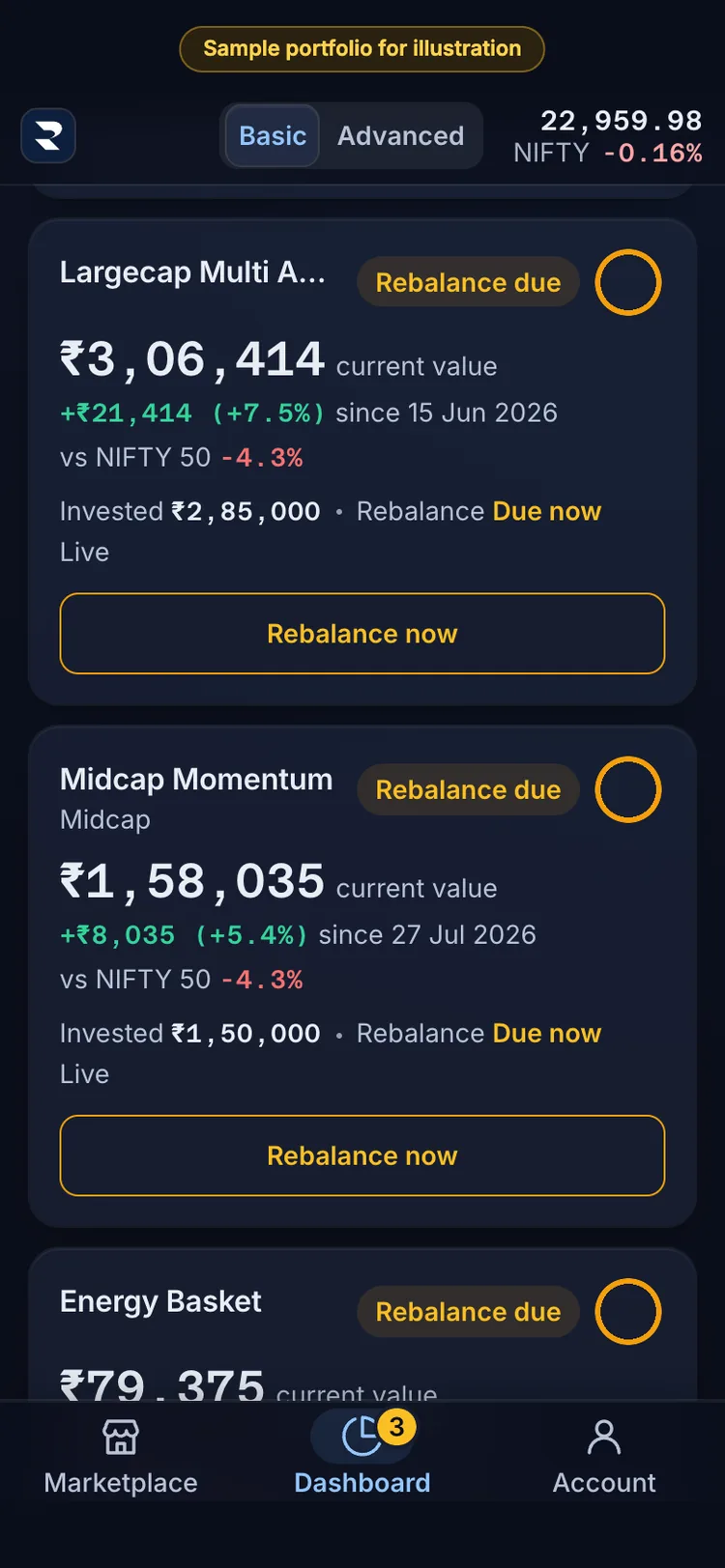
2Each portfolio has a card: current value, the gain since you invested, and the NIFTY 50 beside it. 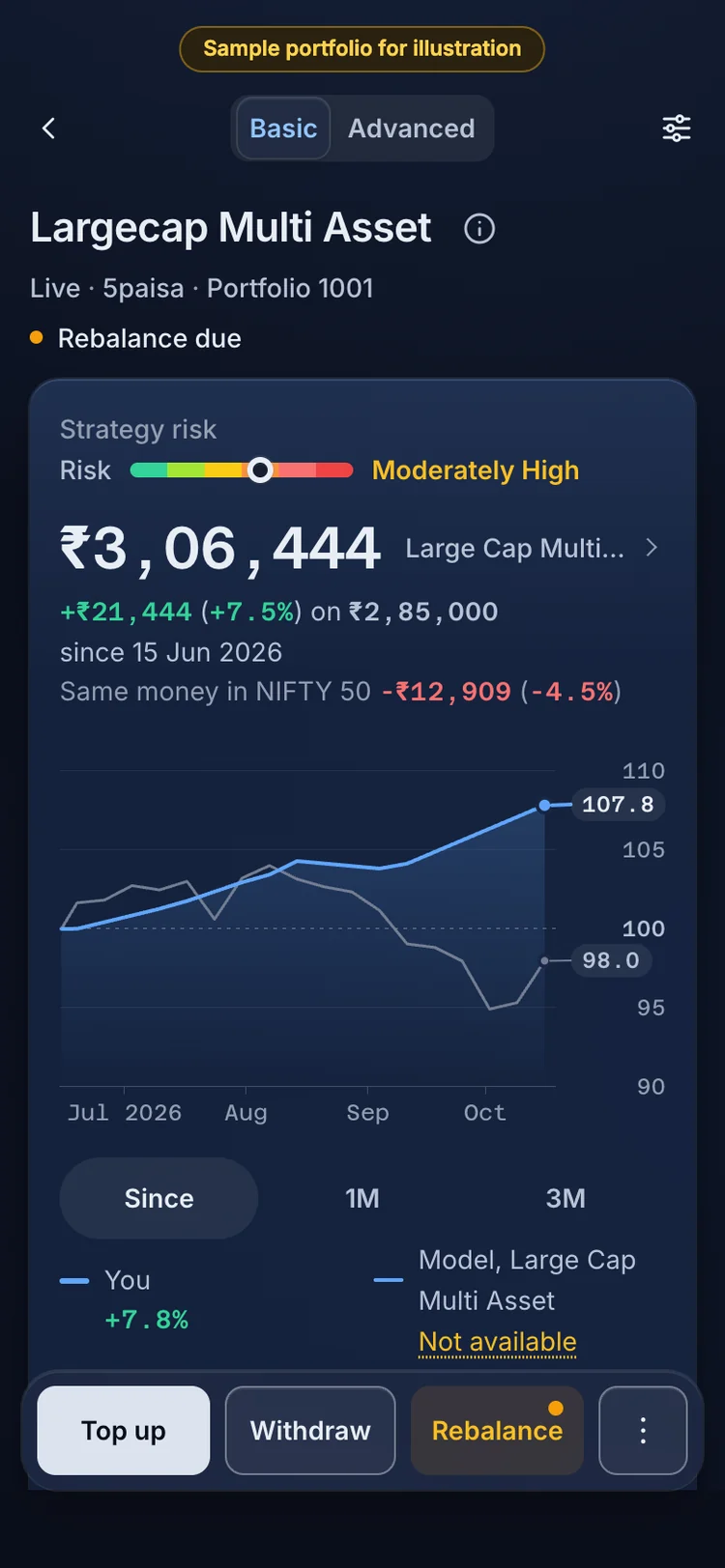
3A portfolio: its value since you invested, and the same money in the NIFTY 50 on your dates. 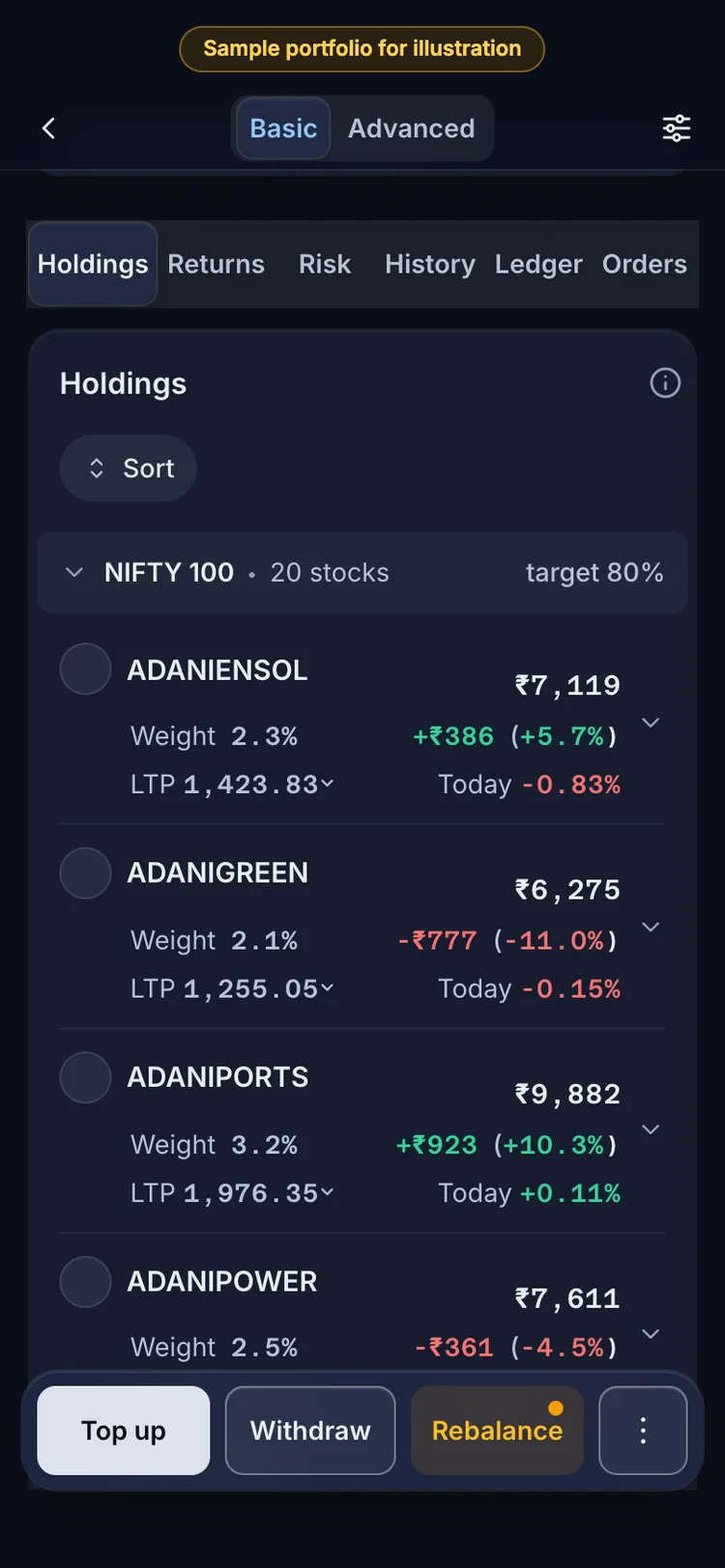
4Holdings: each holding with its value, weight and gain or loss. 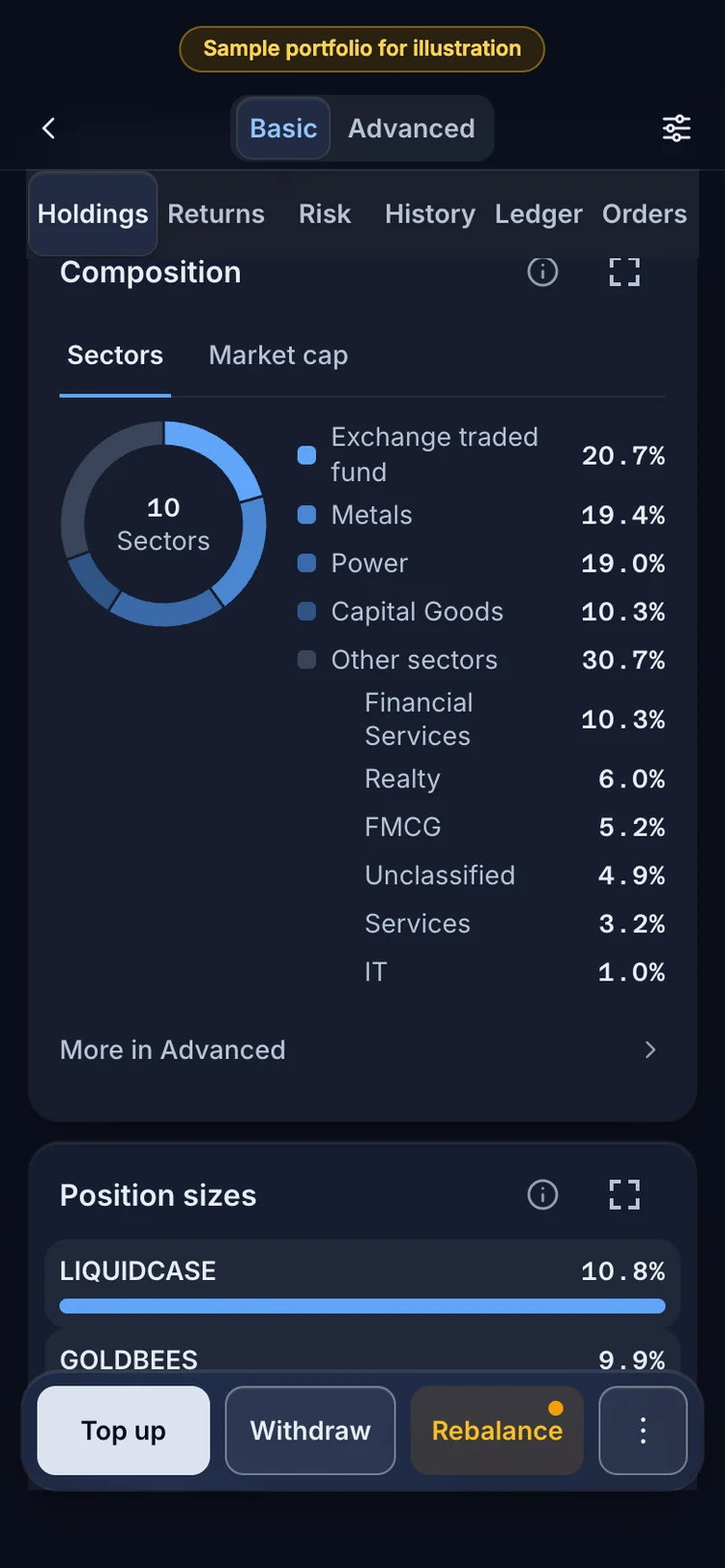
5Composition: what the portfolio owns, by sector and by market cap. 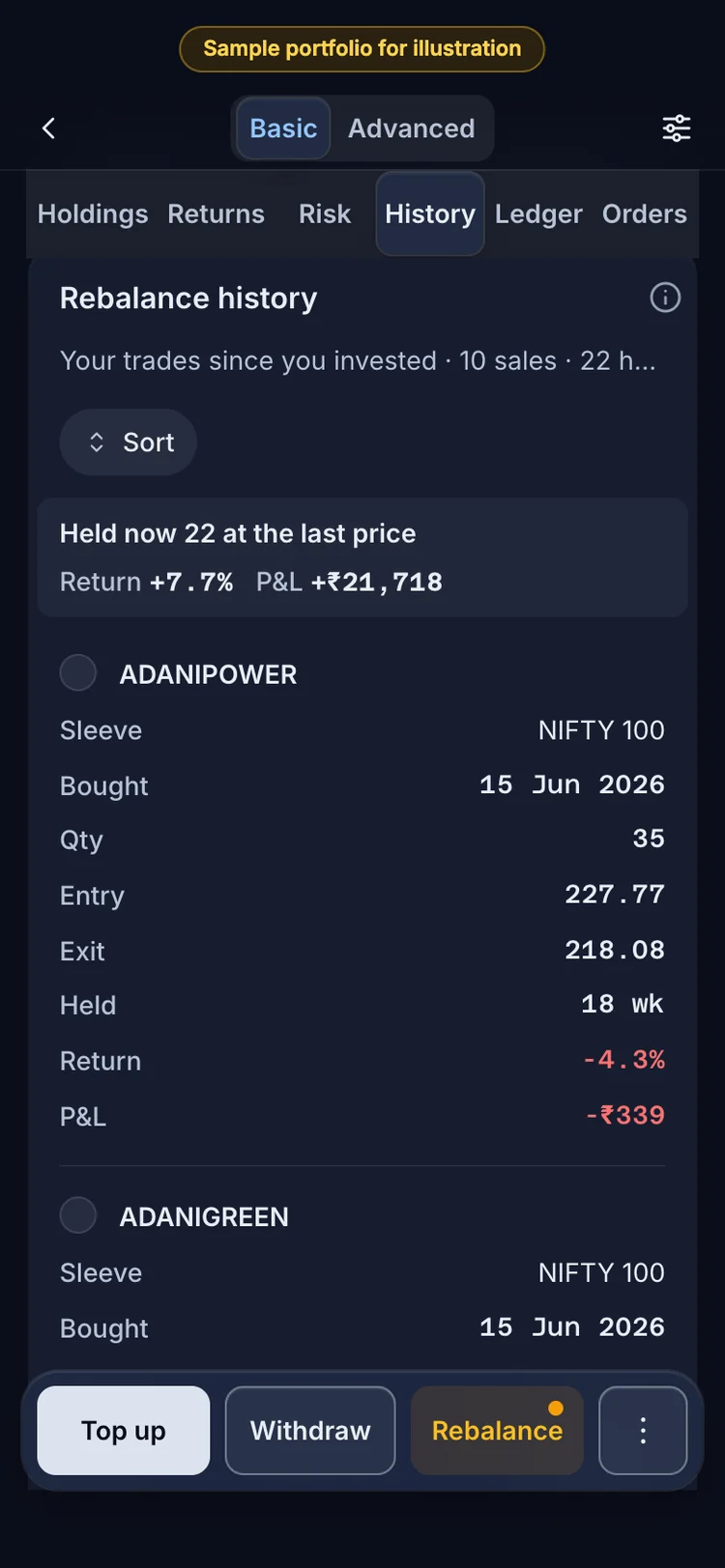
6History: your own trades since you invested, by the rebalance that sold them, and what you hold now. 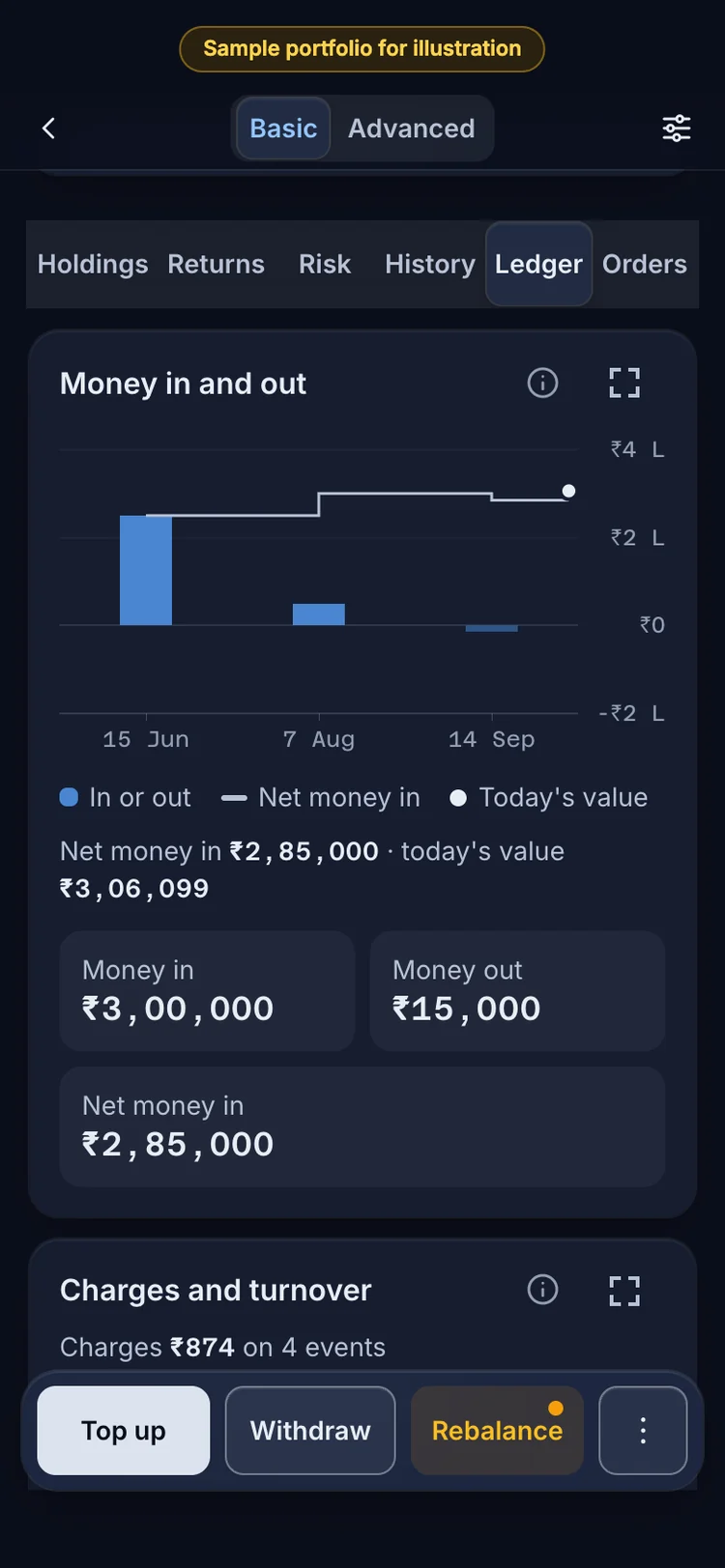
7The Ledger: money in, money out and net invested, then every event with its status.
The Dashboard, a portfolio, its holdings, history and Ledger, screen by screen. Sample investor and sample data, for illustration.
Questions readers ask
Can I top up a portfolio that says Rebalancing now?
No. Top up, Withdraw and Rebalance run only when the status is Up to date. While a task is busy they become available when it finishes. If it stopped, they stay paused until you press Resume.
Why is my Return different from the index's return?
Return is profit or loss over net invested money, so it depends on when you added or took out money. The index return does not. The Same money in NIFTY 50 line applies the index to your own dates and amounts, which is the fair comparison.
Does Practice use real prices?
It follows the strategy's trades with no broker order. It ignores real fills, slippage and partial orders, so a Live portfolio can differ slightly. Module 10.4 explains the gap.
What to remember
- The sheet starts on Practice. Live needs your consent and an open market.
- Invested is net of withdrawals. Return is on that figure, not per year.
- Top up keeps the mix. Withdraw sells every holding in proportion.
- The ring is days gone over days in the cycle. Full means due.
- Needs attention means a task stopped. Resume re-checks the fills.
Rules and figures in this module were last verified on 17 Oct 2026. Tax and regulatory rules change; check the source before acting.